Web system

Effective management of a website's content and functionalities is key to its smooth operation. We create management systems such as CRM, CMS, ERP, MRP, BI and DMS, which provide intuitive operation, full control over content and the possibility of easy expansion. With our solutions, editing, updating and administration of the website becomes fast and convenient.

Happy customer using CRM

What do you gain when we build a system for you?

Woman organising company resources

Efficient management of resources

Efficient management of resources is the foundation of a thriving company, which is why the systems we create ensure full control of operations, optimisation of processes and efficient monitoring of available resources. Thanks to automation and intelligent analysis mechanisms, we eliminate unnecessary waste, which translates into time savings and reduced operating costs. We enable better planning of activities through real-time access to key data, which facilitates sound decision-making. Our solutions integrate with other tools, allowing you to streamline your day-to-day work and realise the full potential of your business.

Woman browsing her offer

Easy offer management

Easy management of your offer is the key to sales success, which is why our systems allow you to quickly and intuitively add, edit and delete products and services. Thanks to a clear interface, the user can easily adapt the offer to current market needs, which increases its attractiveness and competitiveness. Our solutions allow you to easily manage prices, promotions and availability of products and services, resulting in better customer service and higher sales.

Male data processor

Clear reports

Clear reports enable you to analyse data quickly and make sound business decisions. Our systems generate clear reports in the form of charts, tables and interactive dashboards, providing key information on performance, finances, sales and other relevant aspects of your business. This allows you to monitor trends, identify areas for improvement and plan strategic actions with greater precision. Reports are available in real time, allowing you to react in real time to changing market conditions. In addition, our solutions allow you to personalise your reports so you can focus on the data that is most important to your business, saving time and increasing management efficiency.

Demonstration of user management

User access management

User access management is a key element of system security and efficiency. Our solutions enable you to define precise roles and permissions, allowing you to control access to data and functions according to user needs. This allows you to ensure an adequate level of information protection and minimise the risk of unauthorised access. The systems offer an intuitive interface for user management, making it easy to add, edit and delete accounts and assign appropriate roles to them. In addition, our solutions enable you to monitor user activity, allowing you to analyse their activities in real time and respond to potential threats.

Male systems integrator

Integrations with external systems

Integrations with external systems are the key to efficient data exchange and process automation. Our solutions enable you to easily connect to other applications such as ERP systems, CRM systems, e-commerce platforms or analytical tools. This allows you to automate many processes, such as data synchronisation, order management or report generation. Integrations allow you to monitor and analyse data from different sources on an ongoing basis, making your business more efficient and facilitating decision-making. Our systems offer flexible APIs and ready-made plug-ins for the most popular platforms, making integration fast and seamless.

Examples of our management systems

Management system for a tutor - sample modules

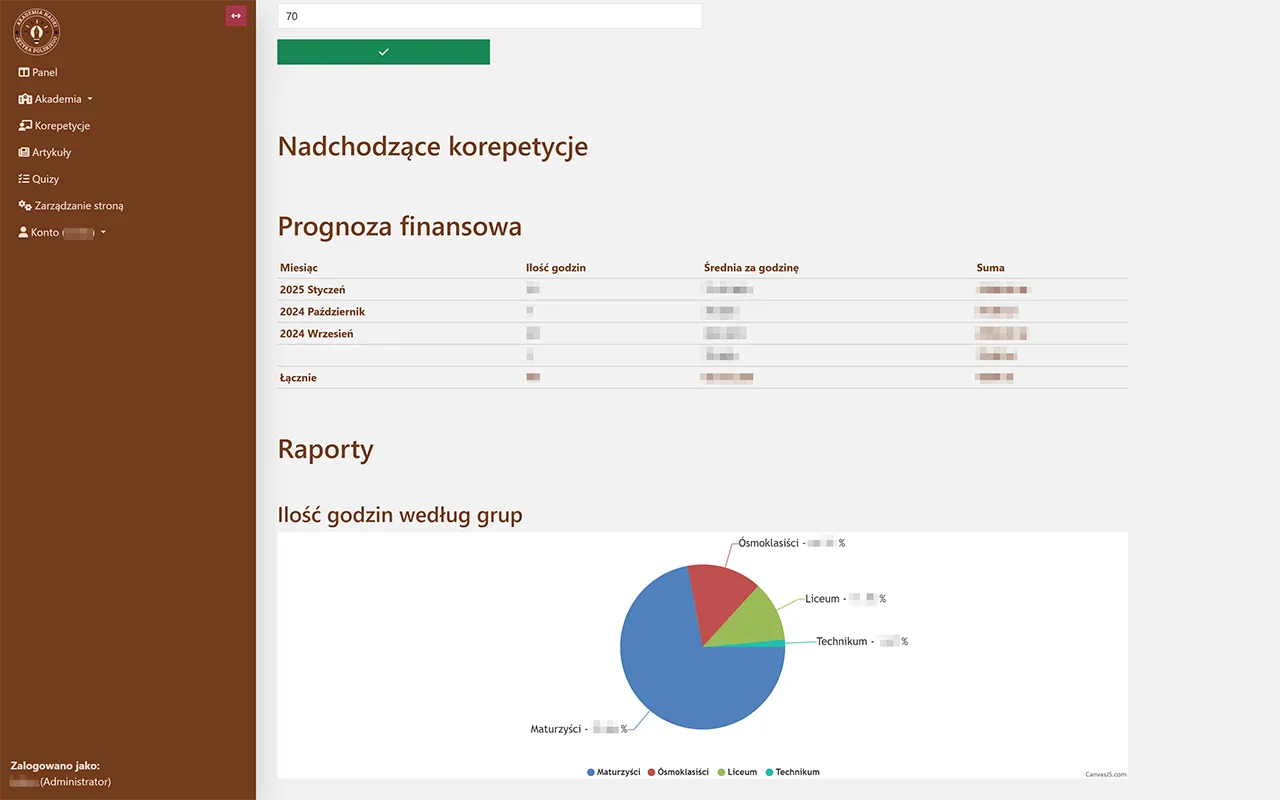
Screenshot of the home page of the tutor system

Summarisation of finances and pupil information

Summarisation of finances and tutee information is a solution that allows the tutor to quickly obtain an overview of tutee group allocation and a summary of earnings. The system automatically organises students according to assigned groups, making it easier to plan lessons and control the schedule. In addition, it generates income statements based on lessons taught, taking into account payment statuses. This gives the tutor quick access to key information without having to manually recalculate earnings or search through notes. This solution can also be used in customer management systems (CRM), where it enables efficient categorisation of clients and monitoring of revenue from particular groups of services.

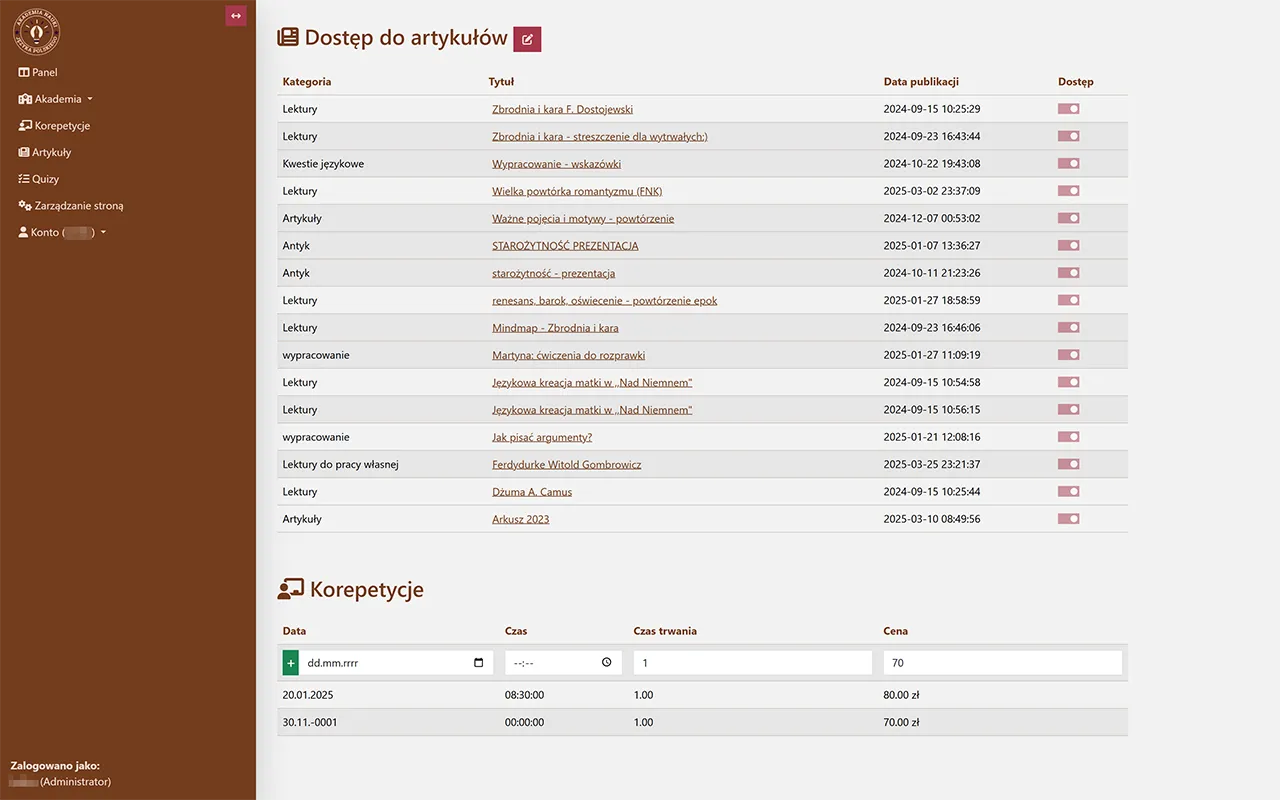
Screenshot of student resources in the tutor system

Student resource management

Student resource management is a functionality that allows the tutor to efficiently collect and organise all relevant materials related to a particular student. The system stores submitted essays, enabling quick preview and evaluation, and also automatically compiles the number of tutoring hours conducted, making it easier for both the tutor and the student to track progress. Additionally, the solution allows for managing access to educational materials – the teacher can share selected resources with the student and monitor which materials have already been downloaded or used. Similar mechanisms can be utilised in client management systems, enabling effective tracking of collaboration history and access to personalised documents.

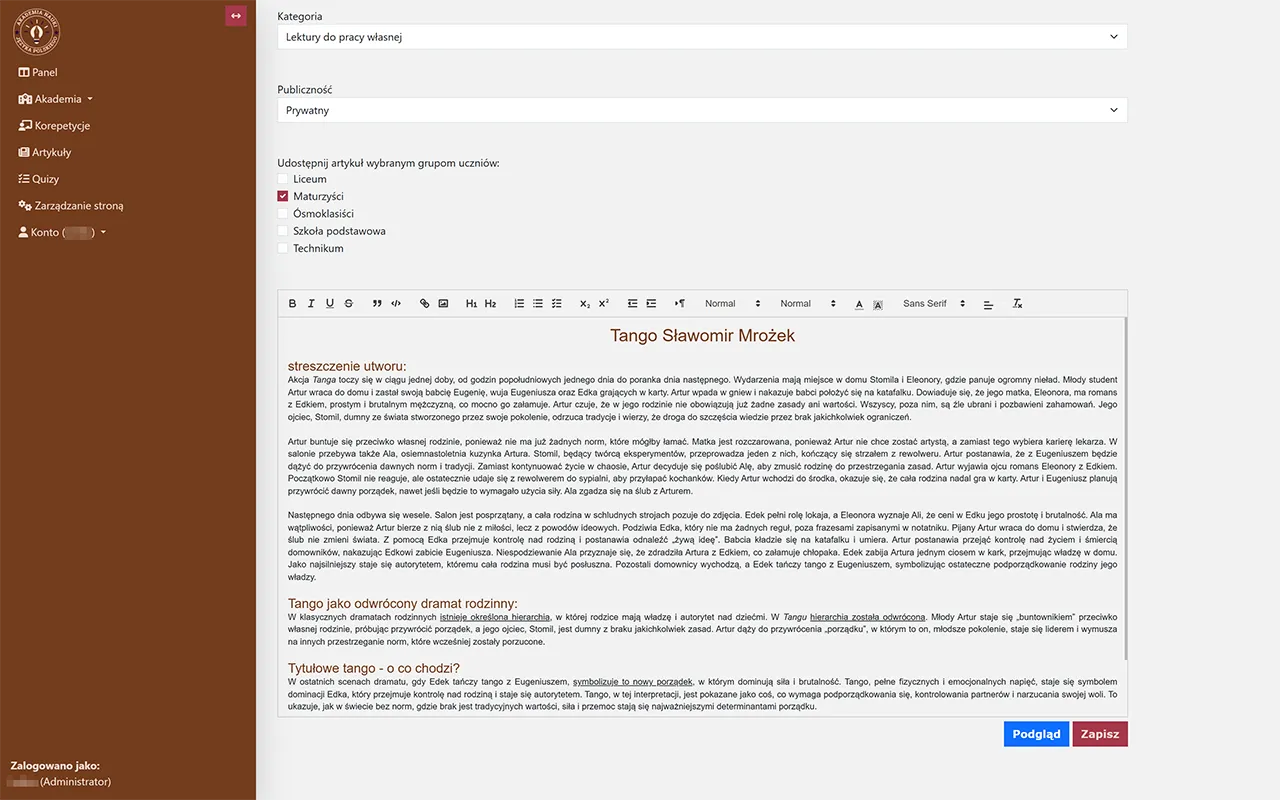
Screenshot of the text editor in the tutor system

Creating textual materials for students

Creating textual materials for students is a functionality that allows the tutor to quickly prepare and organise educational content in one place. The teacher can create notes, instructions, or sample tasks and then share them with selected students or groups. The system also enables editing and updating materials at any time, ensuring their continuous relevance. This way, students always receive well-prepared and tailored materials that help them learn. Such a feature can also be applied in client management systems, allowing for the creation and distribution of documentation, instructions, or offers tailored to specific recipients.

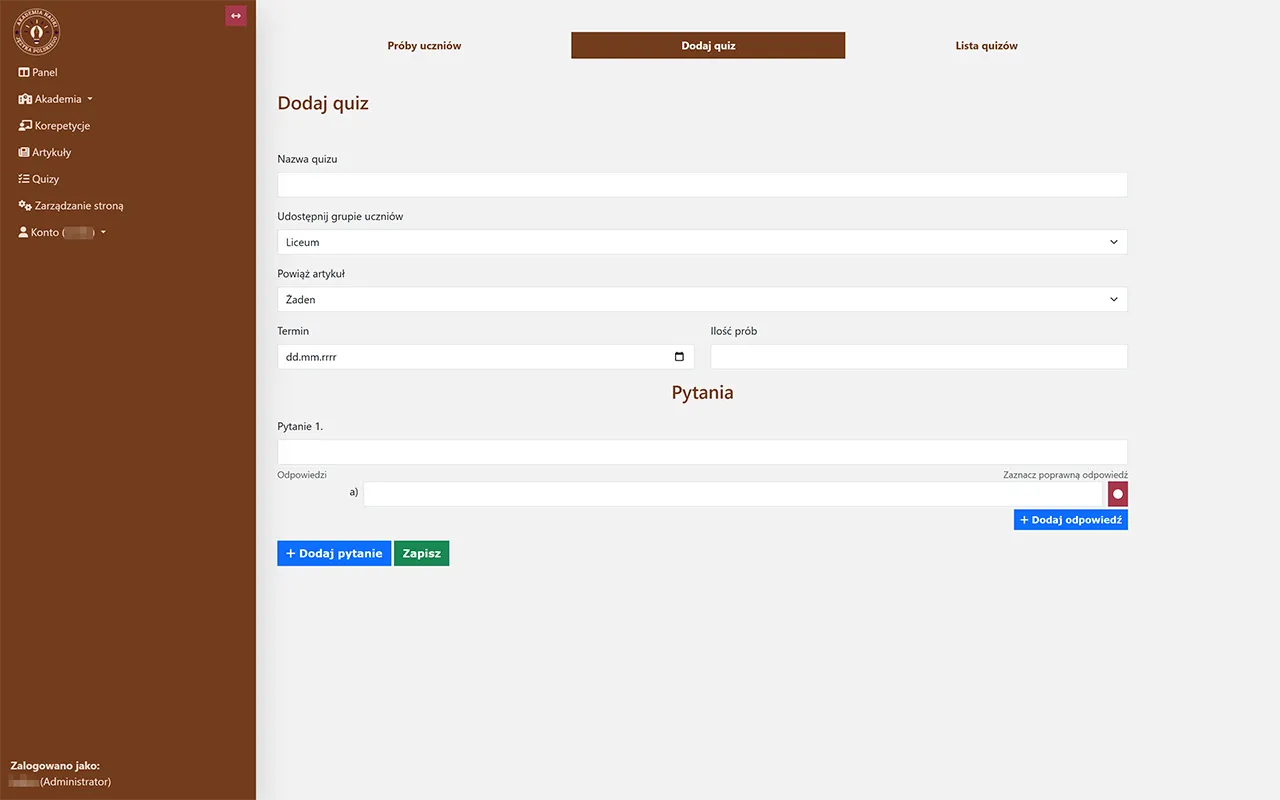
Screenshot of the quiz editor in the tutor system

Creating quizzes and tests

Creating quizzes and tests is a functionality that enables the tutor to design interactive knowledge assessments tailored to students' needs. The teacher can create single-choice and multiple-choice tests, open-ended questions, as well as set time limits and automatic grading. This allows students to regularly check their progress, and the tutor receives immediate feedback on their results. The system also allows for archiving tests and analysing students' achievements over a longer period. Such a solution can also be used in client management systems, enabling, for example, employee competency assessments or automated surveys and satisfaction studies.

Management system for a computer service - sample modules

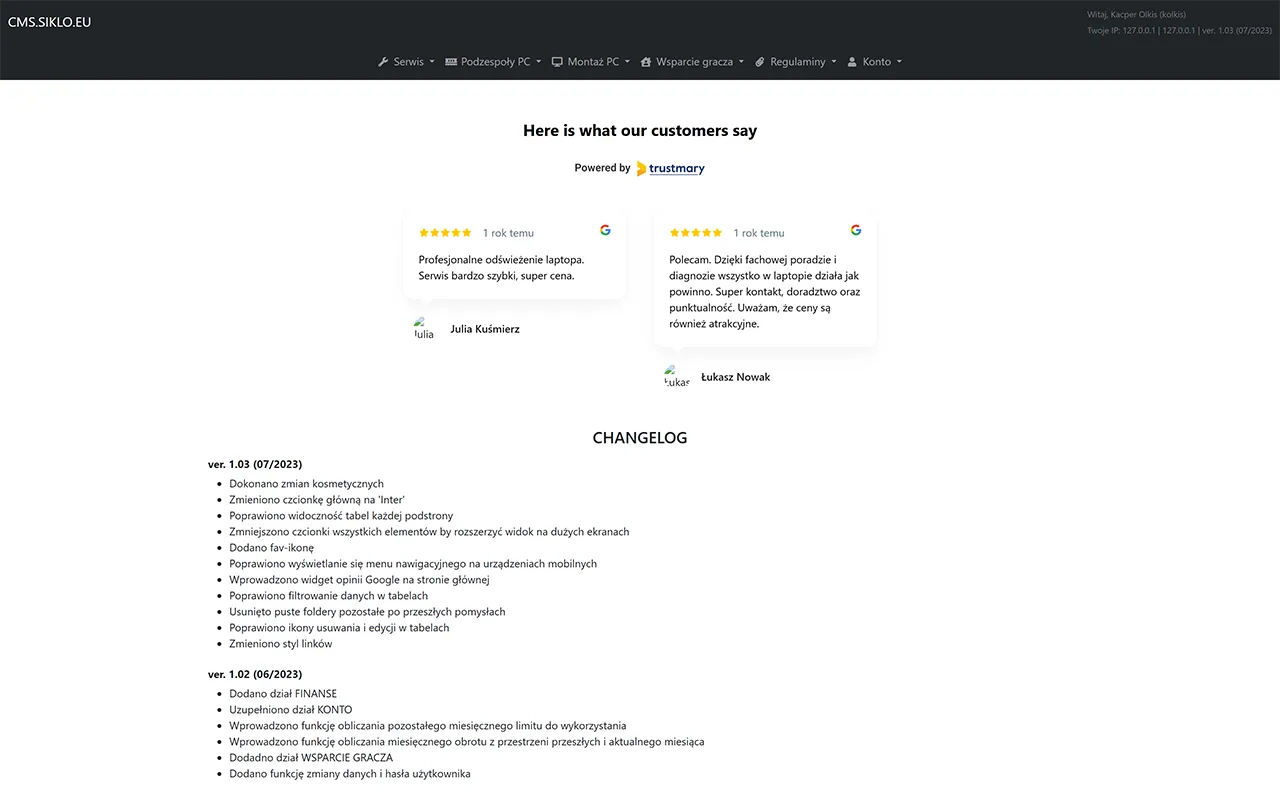
Screenshot of the homepage of the computer service system

Homepage with reviews and system version changes

The homepage with reviews and system version changes is a central panel for computer service administrators, providing quick access to key information. The customer reviews section allows monitoring satisfaction and quickly addressing potential issues, helping maintain high service quality. Additionally, administrators have access to the system's change history – every update, fix, or new functionality is recorded, making it easier to control software development. Such a solution can also be useful in other management systems where tracking user feedback and transparently managing software changes are essential.

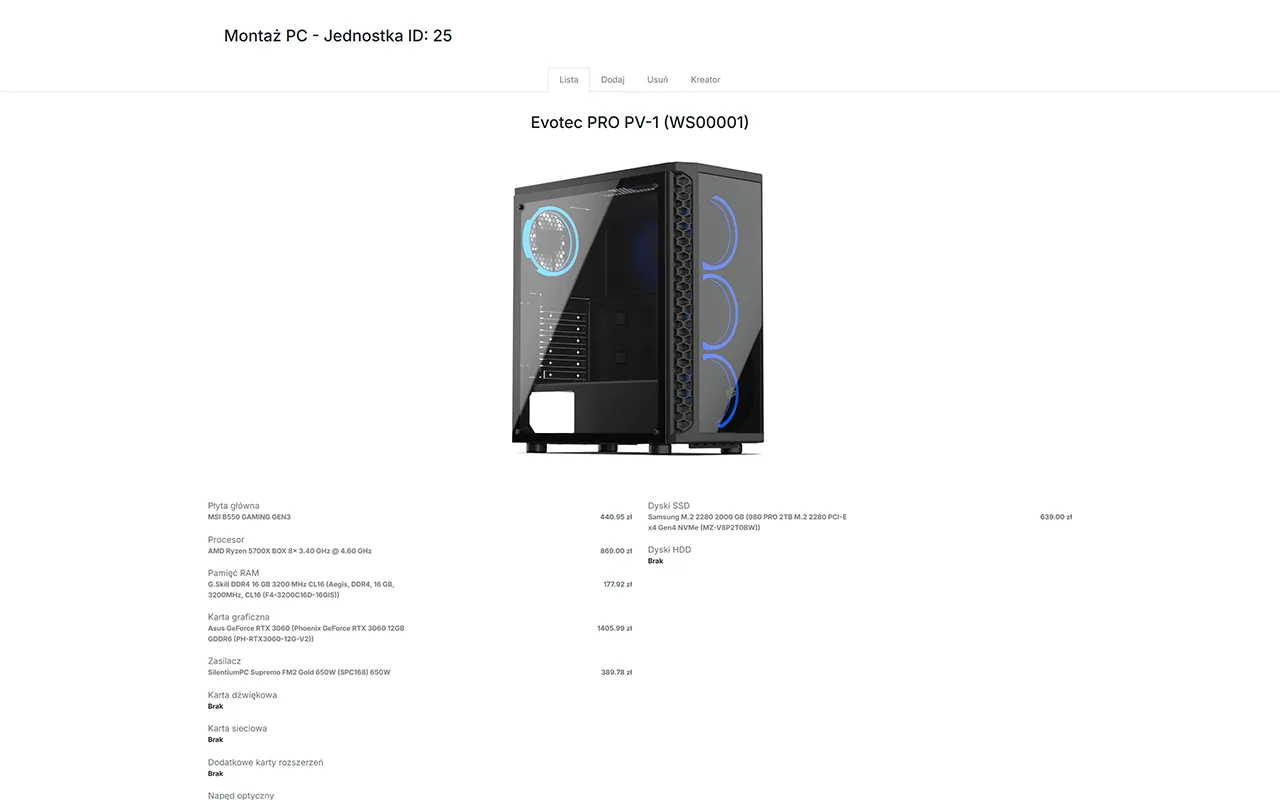
Screenshot of the product information summary in the computer service system

Product information summary

The product information summary is a key element of the management system for a computer service, allowing quick browsing and editing of product data. Administrators can easily add new products, update their descriptions, images, and prices, as well as manage availability. The system automatically generates summaries, making it easier to control the offer and respond promptly to changes in the assortment. Such functionality can also be applied in other management systems where efficient product data management is crucial.

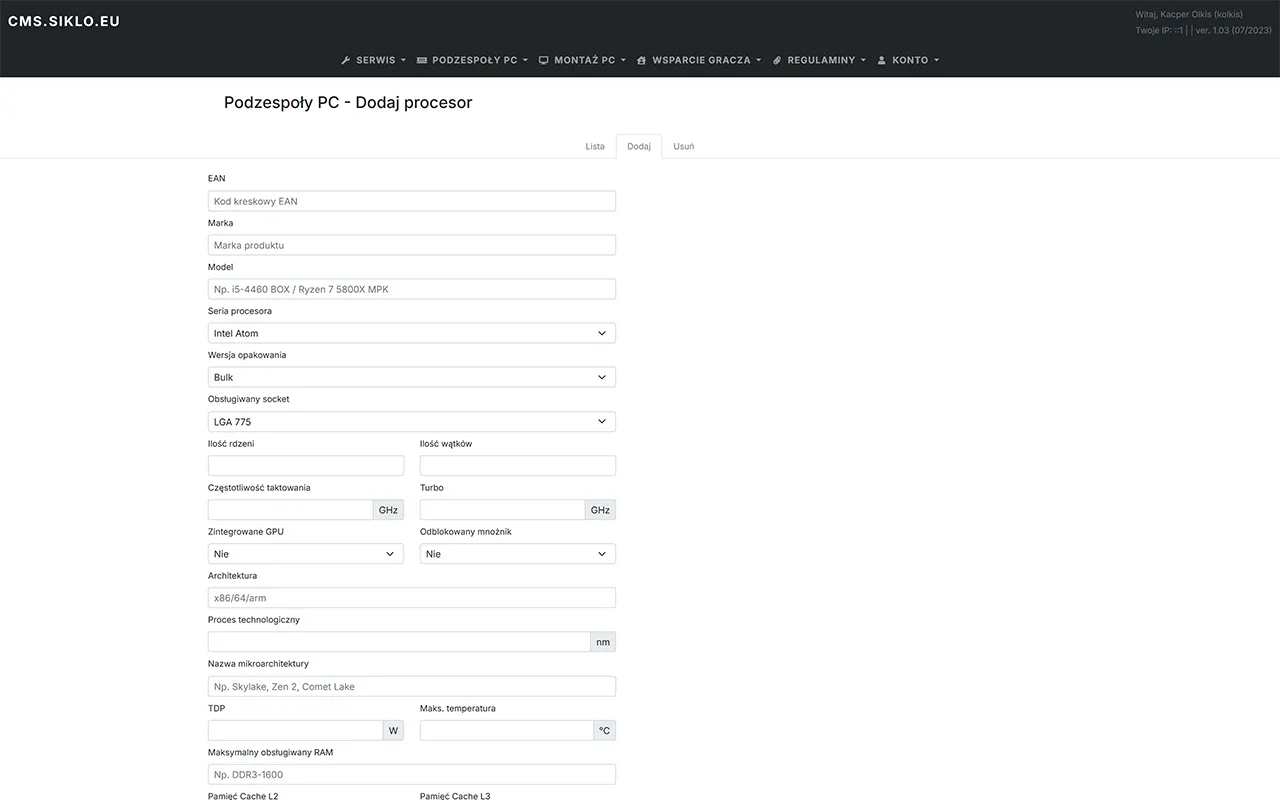
Screenshot of adding product components in the computer service system

Adding product components

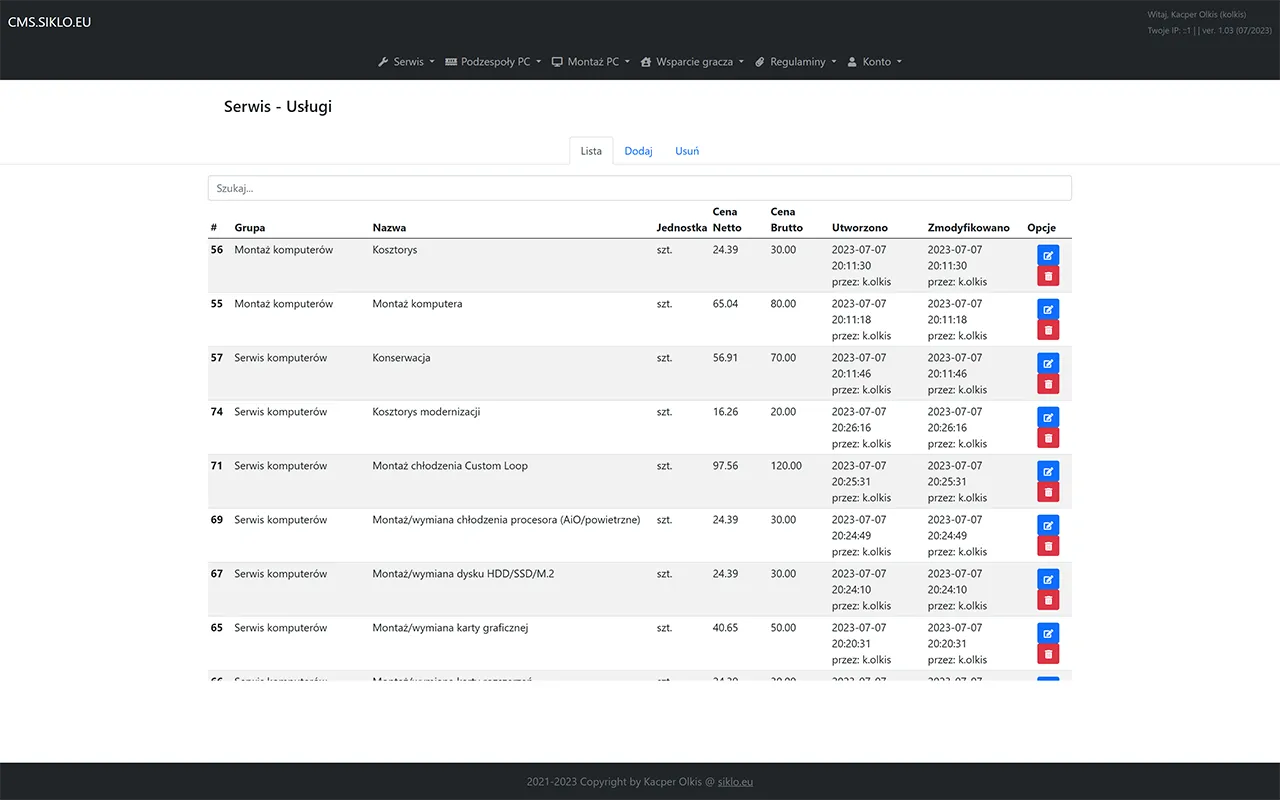
Adding product components is a functionality that allows computer service administrators to quickly and intuitively add new elements to the offer. The system enables easy definition of technical parameters, prices, and availability of components, facilitating assortment management. This allows administrators to respond quickly to market changes and adapt the offer to customer needs. Such a solution can also be used in other management systems where efficient addition and updating of product data are essential.

Screenshot of managing offered services in the computer service system

Managing offered services

Managing offered services is a key element of the system for a computer service, allowing administrators to quickly and efficiently add, edit, and delete services from the offer. The system enables defining detailed service parameters, such as prices, execution time, or availability, facilitating offer management and adaptation to customer needs. This allows administrators to respond quickly to market changes and adapt the offer to current needs. Such a solution can also be applied in other management systems where efficient service data management is crucial.

Screenshot of handling requests and orders in the computer service system

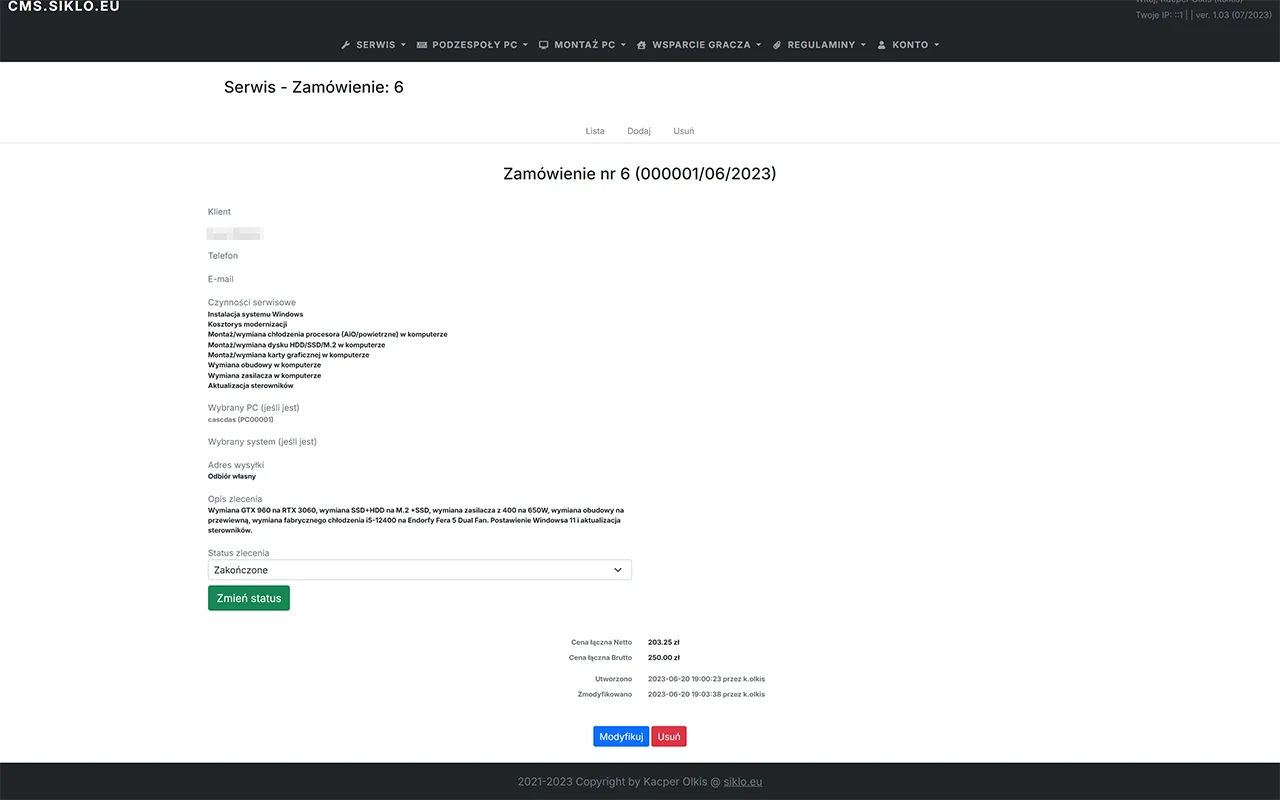
Handling requests and orders

Quick and clear handling of requests and orders is the foundation of a computer service, allowing administrators to efficiently manage the customer service process. The system enables registering requests, assigning them to appropriate employees, and monitoring their status. This allows administrators to respond quickly to customer needs and ensure high-quality service. Such a solution can also be used in other management systems where efficient customer service process management is essential.

Screenshot of delivery options in the computer service system

Delivery options

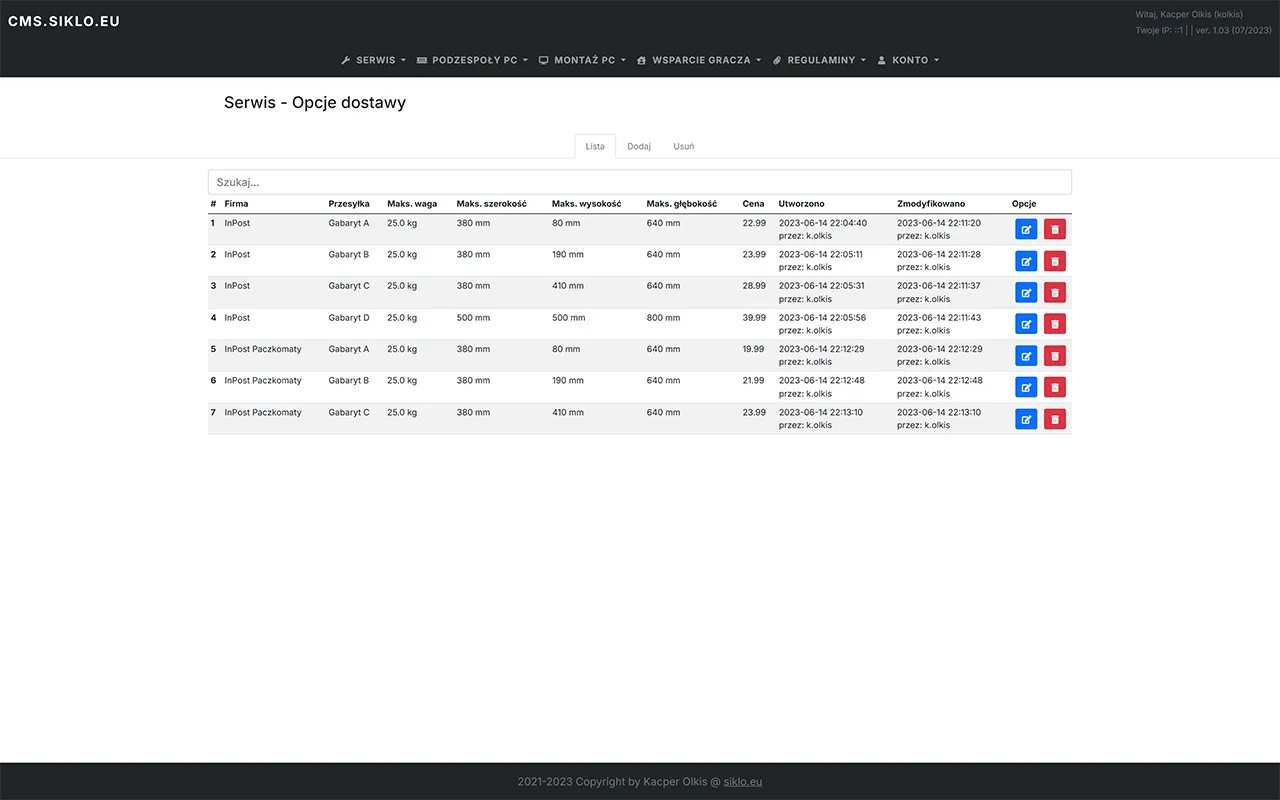
This module allows defining delivery methods. Each method can have various parameters assigned, such as delivery time, cost, and maximum package weight and size. These parameters are considered when calculating delivery costs in orders. This allows administrators to easily adapt the delivery offer to customer needs and monitor its efficiency. Such a solution can also be applied in other management systems where efficient delivery process management is essential.

Management system for a photographer - sample modules

Screenshot of the homepage of the photographer's system

Homepage with shortcuts

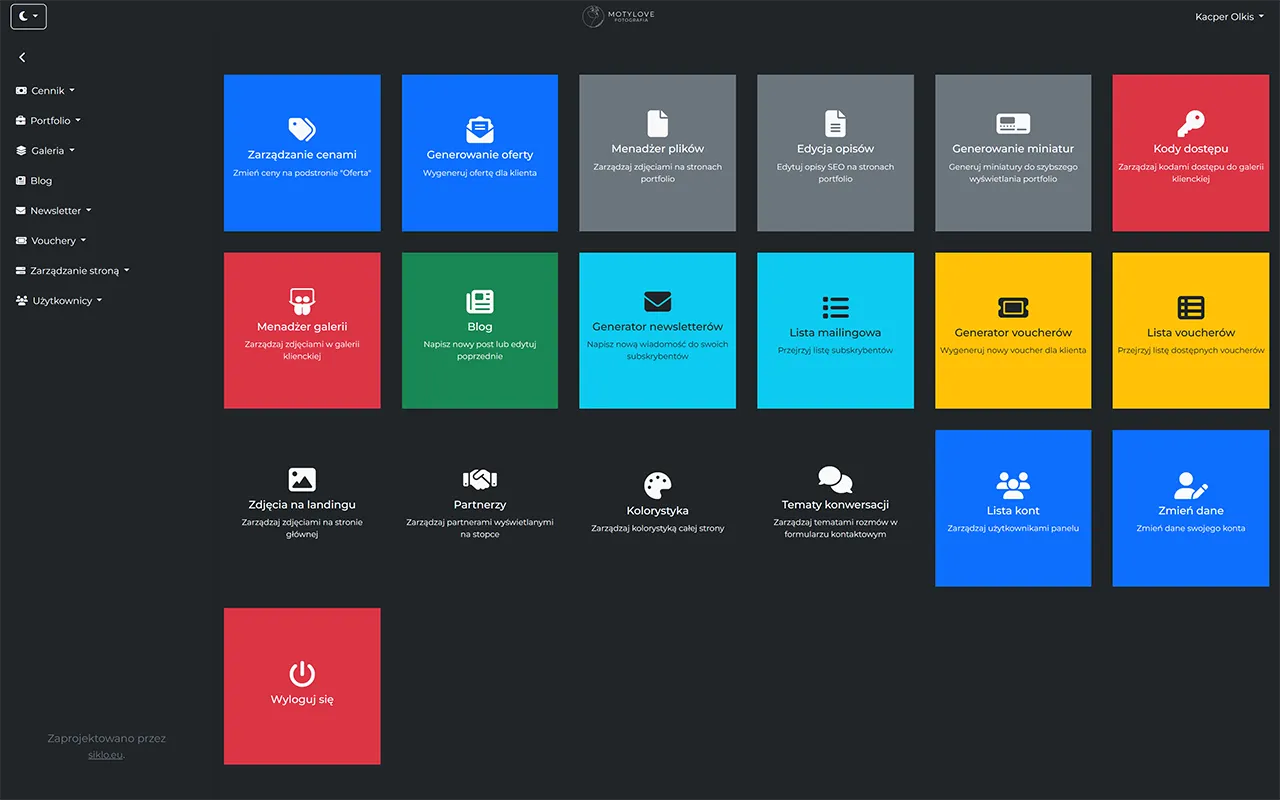
The homepage with shortcuts is a central panel for a photographer, enabling quick access to the most important system functions. The user can easily browse and manage their services, offers, and clients. Additionally, the homepage contains shortcuts to the most frequently used tools, speeding up daily work and increasing management efficiency. Such a solution can also be applied in other management systems where quick and intuitive navigation within the application is essential.

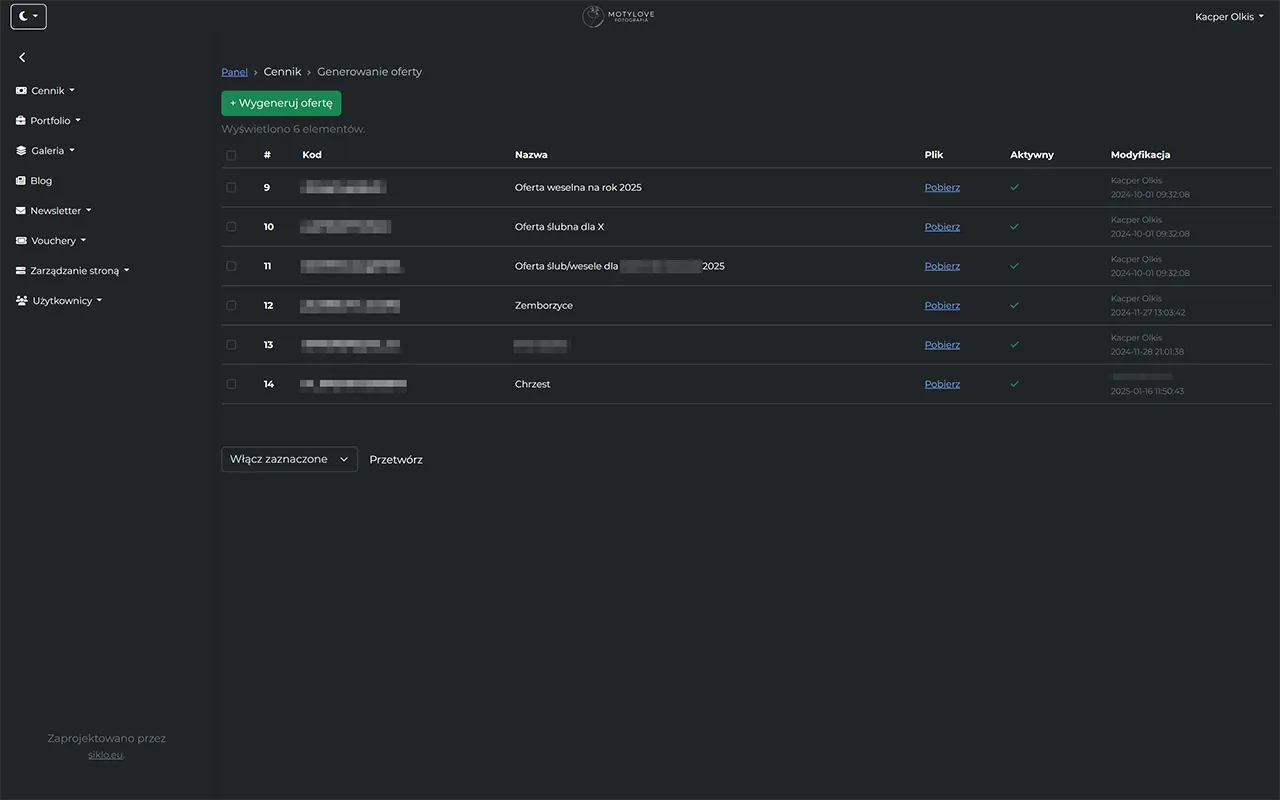
Screenshot of managing personalised offers in the photographer's system

Managing personalised offers

Managing personalised offers is a key element of the system for a photographer, allowing quick and efficient creation and editing of offers tailored to client needs. The user can easily add new offers, set prices, and define detailed offer parameters. The system also enables generating personalised documents, facilitating communication with clients and increasing service professionalism. Such a solution can also be applied in other management systems where efficient offer management is crucial.

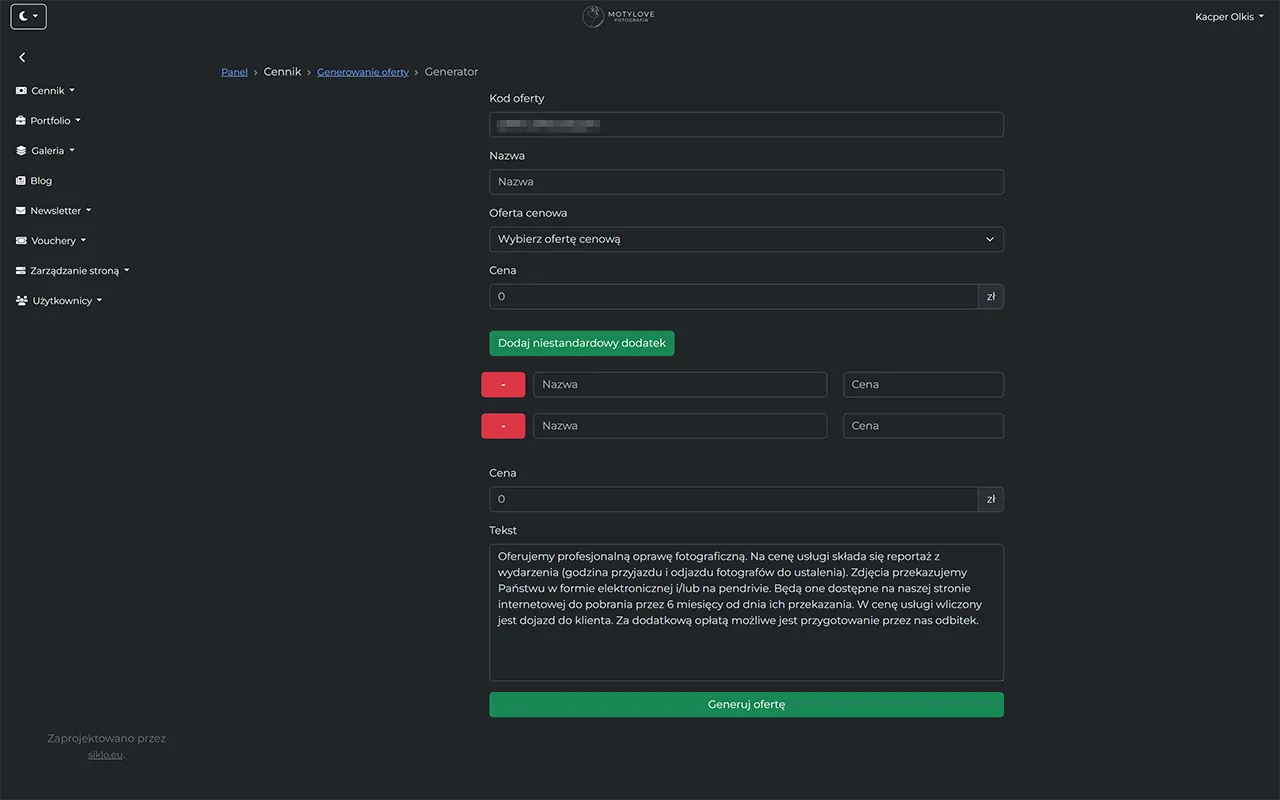
Screenshot of generating offers as images in the photographer's system

Generating offers as images

Generating offers as images is a functionality that allows the photographer to quickly and efficiently create visual presentations of offers. The photographer can easily customise the appearance of offers by adding photos, descriptions, and prices, and then generate ready-made documents in the form of images. This way, the client receives aesthetically prepared offers, increasing the attractiveness of services. Such a solution can also be applied in other management systems where efficient creation of visual presentations is essential.

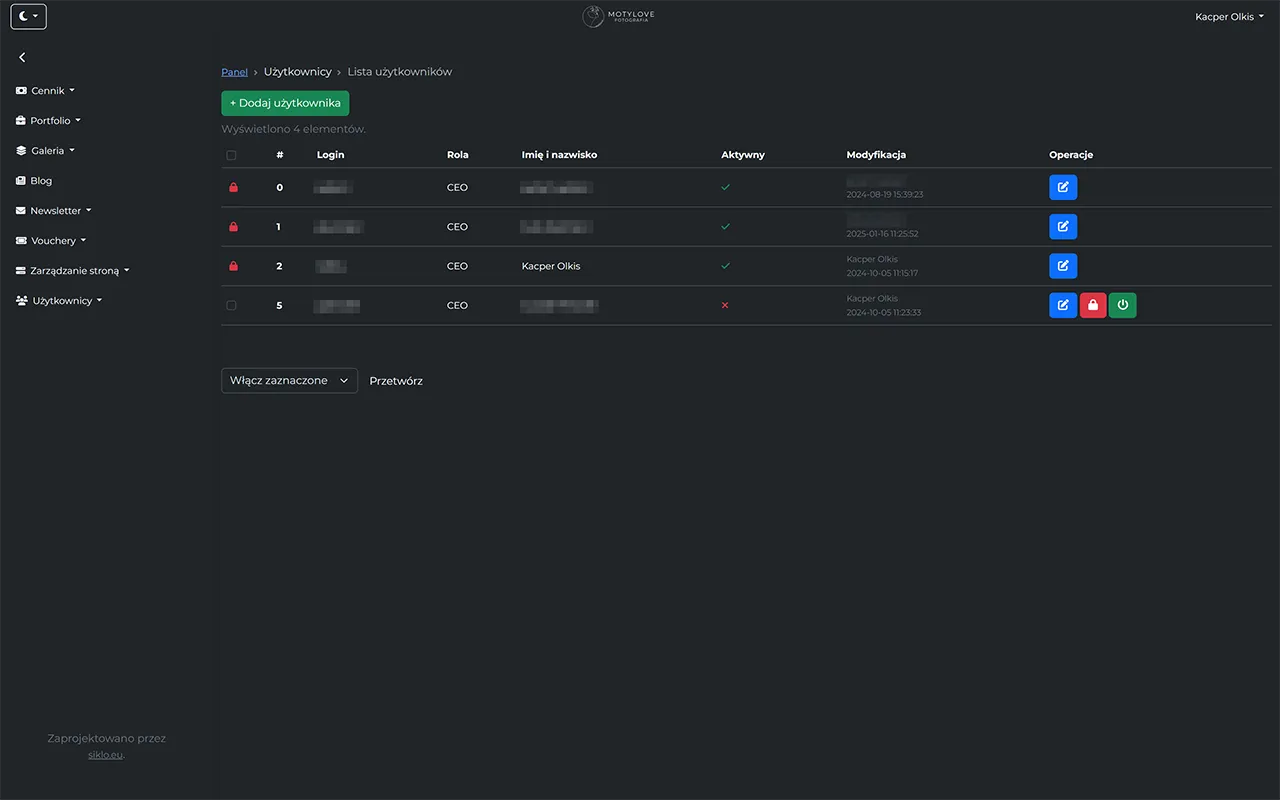
Screenshot of user management in the photographer's system

User management

User management is a key element of the system for a photographer, allowing quick and efficient addition, editing, and deletion of users. The user can easily define roles and permissions for individuals, increasing security and control over data access. The system also enables monitoring user activity, allowing real-time analysis of their actions and responding to potential threats. Such a solution can also be applied in other management systems where efficient data access management is crucial.

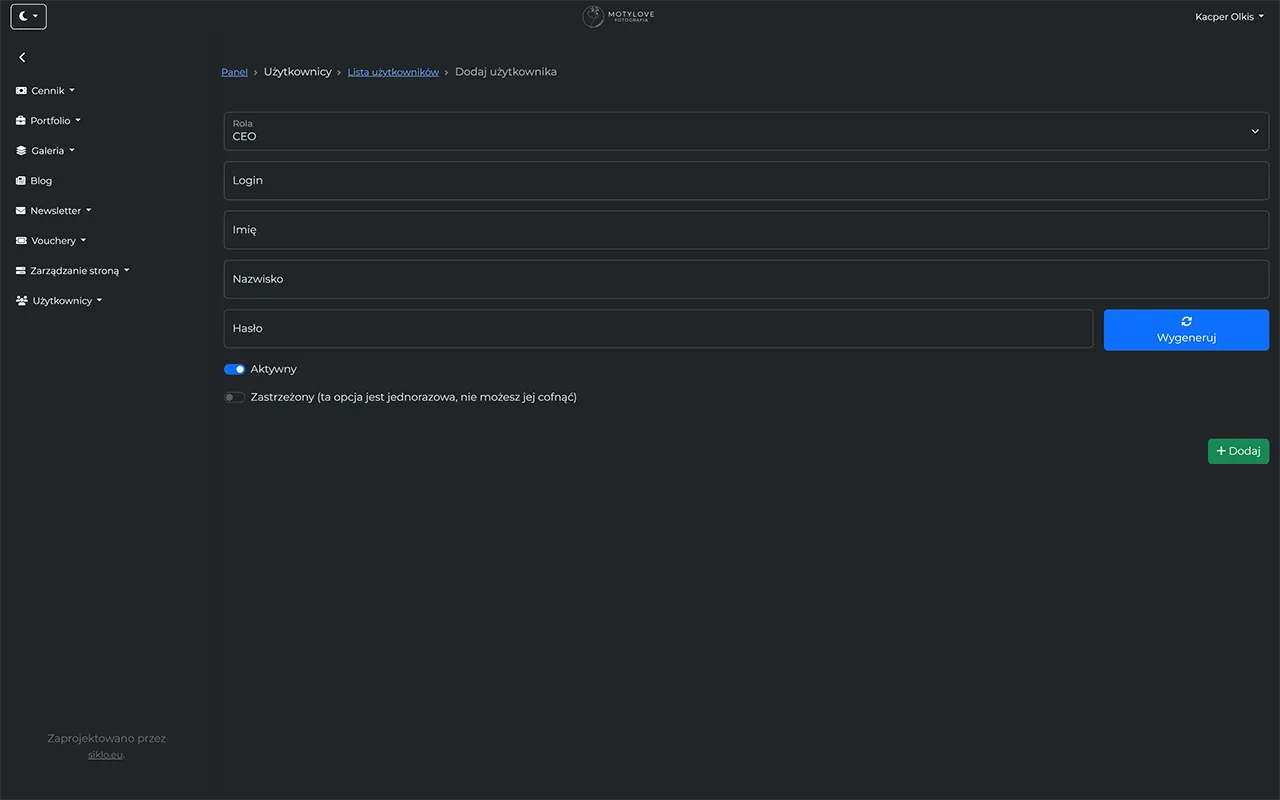
Screenshot of adding a user in the photographer's system

Adding a user

Adding a user is a functionality that allows the photographer to quickly and efficiently add new individuals to the system. The user can easily define personal data, roles, and permissions for individuals, increasing security and control over data access. The system also enables monitoring user activity, allowing real-time analysis of their actions and responding to potential threats. Such a solution can also be applied in other management systems where efficient data access management is crucial.

Make your work easier today

Contact us now!

0/1000